
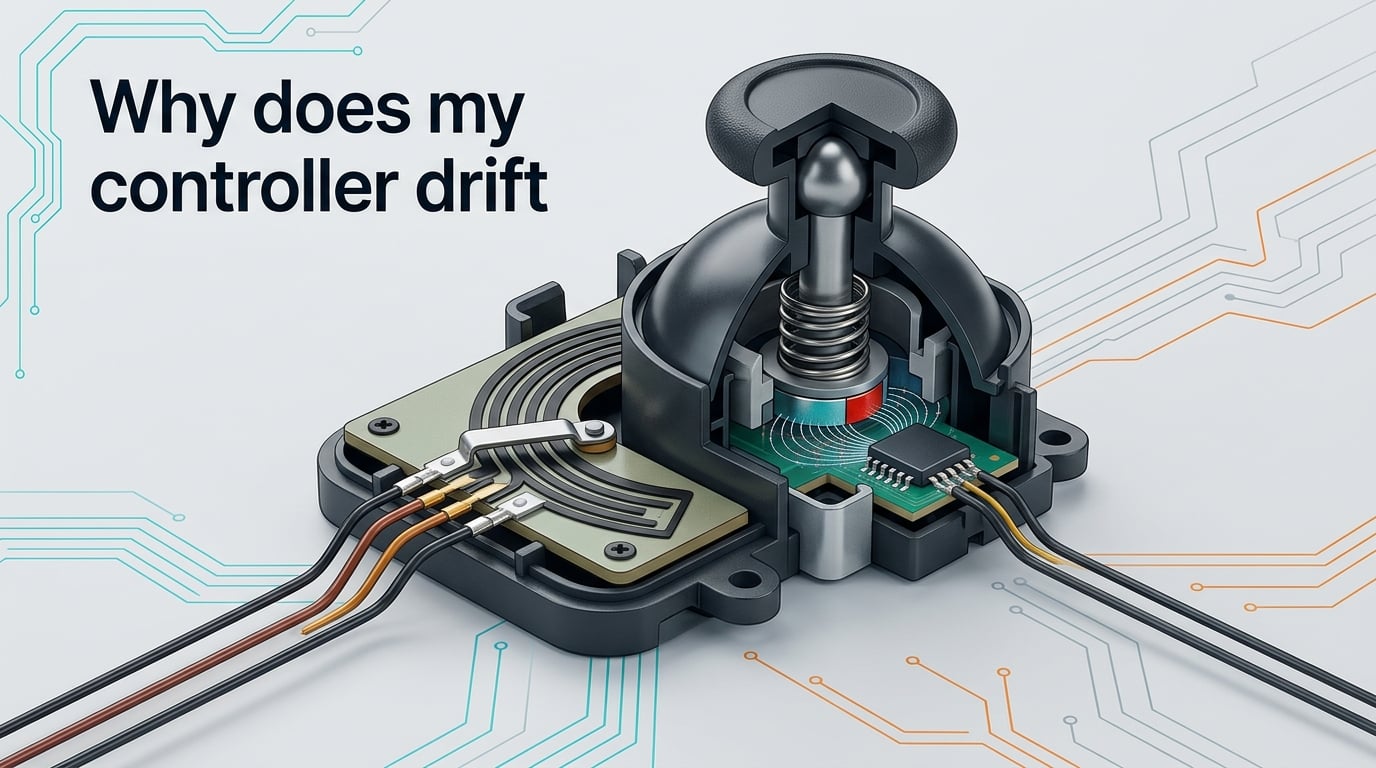
If you have ever watched your character walk off a ledge while your thumbs were nowhere near the thumbsticks, you have already met controller drift. Controller drift is what happens when your analog thumbstick registers movement on its own, sending phantom input to your console or PC even when you are not touching it.
Stick drift is one of the most common frustrations in modern gaming, and it shows up on PS5 DualSense, Xbox, Nintendo Switch Joy-Con, and most PC controllers. In this guide I will walk you through the real reasons drift happens, the quick fixes that buy you time, and the permanent solutions that stop it for good. By the end you will know exactly what is happening inside your controller and what to do about it.
Table of Contents
What Is Controller Drift?
Controller drift is a hardware or software fault that makes an analog thumbstick send input to your console or PC without being touched. Your character walks, your camera pans, or your cursor slides across the screen when your thumb is resting in the center position.
The phantom movement comes from the joystick module misreading its neutral position. On most modern controllers that module is built around a potentiometer, a tiny sliding contact that gradually wears out with use. Drift is the symptom; the wear inside the joystick module is the cause. The good news is that once you understand why drift happens, you can usually stop it, slow it down, or avoid it entirely with the right gear.
Why Does My Controller Drift? The Core Causes
Drift always traces back to one of four root causes. Understanding which one is hitting your controller is the difference between a 10-minute fix and a replacement you did not need.
Worn-Out Potentiometers (the number one cause)
The vast majority of controller drift comes from potentiometer wear. A potentiometer-based thumbstick has two small metal wipers that slide across a resistive carbon track every time you push the stick.
Each push creates tiny friction events, and over months of play the carbon track gradually thins and groves form where your thumb pushes hardest. When the track no longer produces a clean zero reading at the resting position, the joystick module misreports center, and drift begins.
Potentiometer wear accelerates with three habits: aggressive stick movement in FPS games, long competitive sessions, and resting your thumbs on the stick caps when you are not actively aiming. If you have ever wondered why your controller drifts faster than your friend’s identical model, this is usually the reason.
Dust, Debris, and Contamination
Anything that gets between the thumbstick cap and the joystick module can throw off the wiper reading. Dust, skin oils, snack crumbs, pet hair, and even the debris from worn rubber grips can settle under the thumbstick and create phantom input.
Contamination drift often appears suddenly, sometimes after a single long session, and it tends to point in one specific direction. Cleaning alone can clear it up, which makes it the easiest cause to fix and the easiest one to mistake for a hardware fault.
Calibration and Firmware Errors
Sometimes the hardware is fine and the software is to blame. Modern controllers rely on firmware to translate the joystick module’s analog readings into digital input, and that translation can drift out of range after a firmware update, a system update, or even a hard drop.
Recalibration resets the center reference the controller uses, and in a surprising number of cases a clean recalibration makes drift disappear overnight. Firmware-related drift is also why your controller can start drifting immediately after you update your console, and why the same issue can vanish after the next update.
Manufacturing Tolerances and Early-Life Drift
Not every drift story is about heavy use. Some controllers drift within weeks of unboxing, and that points to manufacturing tolerances – tiny variations in how tightly the joystick module was assembled or seated on the PCB.
A loose module, a slightly off-center stick cap, or a low-grade resistive track can all cause drift before any wear has happened at all. Reddit threads on r/hardware and r/xbox are full of users reporting three or more consecutive Xbox controllers drifting within a year of purchase, which is exactly the symptom pattern of out-of-the-box tolerance issues rather than long-term wear.
If your controller drifts within 6 to 12 months, do not assume you wore it out. It may be a warranty claim waiting to happen.
Why Is Stick Drift So Common?
Stick drift is so common because the vast majority of controllers still ship with a design that guarantees eventual failure under real use. The potentiometer was chosen decades ago because it is cheap, small, and accurate enough for gaming – but it is fundamentally a wearing part.
Every push is a tiny wear event, and the thousands of micro-movements per session add up. Compared with the Hall Effect and TMR sensors now entering the market, potentiometer modules have a dramatically shorter functional lifespan under heavy use. That is why drift feels like a new problem even though the technology is old – today’s games demand far more from the thumbstick than the games of the PS2 or Xbox 360 era ever did.
Which Controllers Drift the Most?
Drift is a universal problem, but some platforms seem to hit it harder than others based on user reports.
PS5 DualSense owners on r/PS5 frequently report drift appearing inside the first year, often with the left stick drifting upward. Xbox One, Xbox Series X, and Xbox Series S controllers show a similar pattern, particularly when used with Windows 11 PCs, where multiple users have reported three consecutive controllers all drifting on the right stick. Nintendo Switch Joy-Cons are notorious for early-life drift because of their small thumbsticks and exposed stick wells, and most PC controllers using standard potentiometer modules follow the same curve.
Platforms that use Hall Effect sensors by default (or offer it as an upgrade) consistently show fewer drift complaints in user threads. The pattern is clear: the technology inside the joystick module matters more than the brand on the shell.
How to Fix Stick Drift (Temporary and Permanent)
There are four levels of fix, ranging from a 30-second workaround to a permanent hardware swap. Try them in order.
Quick Temporary Fixes
If you need your controller working right now, these three moves buy you a session or two:
- Push the drifting stick firmly in the opposite direction of the drift and hold it there for 10 seconds, then release to center.
- Blow compressed air around the base of the thumbstick to dislodge loose debris.
- Reset the controller by holding the system-specific sync button for 5 to 10 seconds until the lights reset, then re-pair it.
These are temporary patches. Drift returns within a few sessions for most users because they do not address the actual wear inside the joystick module.
Cleaning Your Thumbsticks Step by Step
If contamination is your culprit, a proper clean often clears drift completely. Power off the controller first, then follow these steps.
- Remove the thumbstick caps if your controller allows it – Joy-Cons and most modular thumbsticks pull straight up.
- Apply a small amount of 90%+ isopropyl alcohol to a cotton swab.
- Rotate the swab gently around the well under the stick cap, lifting dust and oil residue.
- Re-seat the thumbstick cap, let everything dry for 2 minutes, then power on and test.
For deeper cleaning, some users carefully open the controller with a plastic spudger, clean around the joystick module with IPA, and reseat the ribbon cable. This is more involved and voids warranty, so do it only when simpler fixes have failed.
Dead Zone Adjustment
Adjusting the dead zone in your console or game settings tells the system to ignore any input below a certain threshold. This does not fix the underlying drift, but it hides it well enough for casual play and is the single most popular temporary workaround on r/gaming.
On PS5, find this under Settings, Accessibility, Controller. On Xbox, the Xbox Accessories app includes a dead zone slider. On PC, Steam lets you set a per-game dead zone under Controller Settings. Start small – around 5 to 10 percent – and only increase if drift still shows through.
Permanent Solutions: Hall Effect and TMR Sensors
The only true permanent fix is replacing the joystick module with one that has no wearing parts. Hall Effect sensors use magnets instead of sliding contacts, so there is nothing to wear out even under aggressive play. TMR (Tunneling Magnetoresistance) sticks are the newer alternative, offering higher precision and lower power draw.
You get Hall Effect or TMR sticks by buying a controller that already ships with them – brands like 8BitDo, SteelSeries, and several premium PC pads now offer these as standard – or by buying a controller with a modular joystick that you can swap yourself. Either path removes the fundamental cause of potentiometer-based drift and is what most drift-fatigued gamers eventually move to.
How to Prevent Controller Drift Long-Term
Once you have a working controller, a few habits stretch its life significantly. Store the controller in a clean, dry spot away from direct sunlight and humidity, because both moisture and heat accelerate rubber and plastic breakdown. Avoid resting your thumbs on the stick caps when you are not actively aiming, since constant pressure wears the resistive track unevenly. Wipe the thumbstick wells with a dry microfiber cloth every few weeks to keep debris from settling in.
If you grind competitive FPS or fighting games for several hours a day, plan for the joystick module to wear out faster than a casual player’s. Either budget for replacement modules every 12 to 18 months, or jump to a Hall Effect controller now and skip the cycle entirely.
Is Stick Drift Covered Under Warranty?
It depends on the manufacturer, and it is worth knowing before you buy. Sony generally covers DualSense drift under the standard 12-month limited warranty, Microsoft handles Xbox controller drift on a case-by-case basis through support, and Nintendo’s Joy-Con drift repair program has historically replaced affected units free of charge even outside warranty in some regions. Documentation and proof of purchase speed up every claim, so keep your receipts and original packaging.
Frequently Asked Questions
What is controller drift?
Controller drift is when your analog thumbstick registers movement even when you are not touching it. Your character walks, your camera pans, or your cursor moves on its own because the joystick module misreads its center position. It is most often caused by wear inside a potentiometer-based thumbstick.
Is stick drift a bad thing?
Yes. Stick drift sends phantom input to your console or PC, which makes aiming unreliable, causes unintended movement, and can ruin competitive matches. Beyond gameplay, drift often signals physical wear that gets worse over time, so it is best addressed early rather than ignored.
Can stick drift be fixed permanently?
Only by replacing the wearing parts. Software workarounds like dead zones, recalibration, and cleaning can reduce or hide drift, but they do not stop the underlying wear. Permanently fixing drift means installing Hall Effect or TMR sensor sticks, either by buying a controller that already includes them or by swapping the joystick module yourself.
Do all controllers eventually get stick drift?
All controllers using traditional potentiometer-based thumbsticks will eventually drift under normal use, because the sliding wiper contact wears the resistive carbon track over time. Controllers using Hall Effect or TMR sensors do not have this failure mode and, in real-world testing, essentially never drift.
Why do Xbox controllers get stick drift so easy?
Xbox controllers use the same basic potentiometer joystick module design as other modern pads, so they wear out on a similar timeline. Users report Xbox drift more often partly because of the platform’s massive installed base and partly because Windows 11 pairing exposes tiny module tolerances that would otherwise go unnoticed on console.
What causes stick drift on PS5?
PS5 DualSense stick drift is caused by the same four issues as other controllers: worn potentiometers from aggressive play, dust or debris under the thumbstick cap, firmware or calibration errors after system updates, and manufacturing tolerance issues that show up early. Heavier use in FPS and fighting games accelerates potentiometer wear.
How to stop controller drift on PS4?
Start with the easiest fixes first: clean around the thumbstick with compressed air, recalibrate the controller through the PS4 Accessories menu, and reset the controller with a paperclip in the small reset hole on the back. If drift continues, raise the dead zone under Accessibility settings. For a permanent fix, replace the joystick module with a Hall Effect stick or upgrade to a PS5-era pad with Hall Effect built in.
The Bottom Line
If you have ever wondered why does my controller drift, the honest answer is that the joystick module inside almost every controller is built around a wearing part. Potentiometer wear, contamination, calibration drift, and tolerance issues all feed into the same symptom, and once you know the cause, the fix path is clear: clean it, recalibrate it, adjust the dead zone, or replace the joystick module with a non-contact Hall Effect or TMR version. Most gamers get back to clean input within an hour using the steps above. If drift keeps coming back, that is the controller’s way of telling you it is ready for an upgrade.