
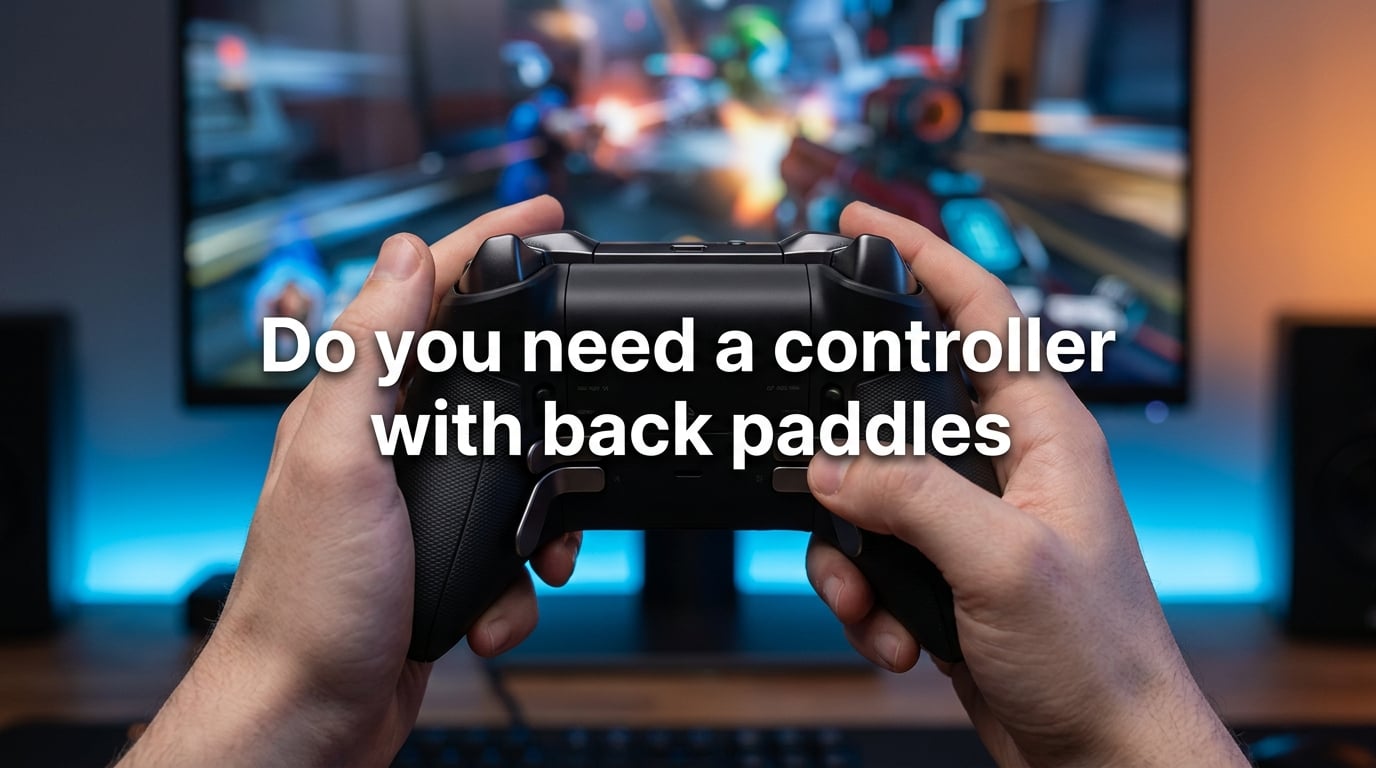
You need a controller with back paddles if you regularly play competitive shooters, battle royale games, or any title where keeping both thumbs on the sticks matters more than the cost of the controller.
If you mostly play single-player story games, casual co-op, or party titles on the couch a few nights a week, back paddles are a nice-to-have, not a necessity. Our team tested paddle-equipped controllers across Call of Duty, Apex Legends, Elden Ring, and Halo for several weeks, and the pattern was clear: the more you depend on uninterrupted aim, the more back paddles earn their keep.
Here is the quick version before we go deeper. Back paddles are extra buttons on the rear of a controller that you press with your middle or ring fingers. You remap your most-used face buttons (jump, crouch, reload, melee) onto those paddles so your thumbs never leave the analog sticks. That is the whole idea, and it solves one specific problem: the constant trade-off between aiming and acting in fast-paced games.
To decide if you fall into the “yes, buy paddles” group or the “skip for now” group, work through this short framework:
- You play competitive multiplayer at least a few times a week → yes, back paddles will help.
- You lose gunfights because you have to take your thumb off the right stick to crouch or jump → yes, back paddles solve exactly this.
- You mostly play slow-paced RPGs, puzzle games, or turn-based titles → probably not worth it yet.
- You have a disability or hand condition that makes certain grips painful → back paddles can be a genuine accessibility upgrade.
The rest of this guide walks through how back paddles work, who really benefits, which games reward them most, how to map your buttons, and when you should honestly skip them.
Table of Contents
What Are Back Paddles and How Do They Actually Work?
Back paddles are small buttons mounted on the rear of a game controller that sit just under where your middle or ring fingers naturally rest. You press them by squeezing the controller slightly, and each paddle acts as a duplicate of any other button on the pad.
The standard mapping is simple. You take face buttons like A, B, X, or Y on Xbox, or Cross, Circle, Square, Triangle on PlayStation, and assign them to a back paddle through the controller’s companion software or onboard profiles. Press the paddle, the game sees the same input as the face button, and your thumb never has to leave the stick.
That is the entire mechanism, and it is more powerful than it sounds. In a game like Apex Legends, the difference between losing and winning a 1v1 often comes down to whether you can slide, jump, and crouch while tracking an enemy. Without paddles, every one of those actions means taking your right thumb off the aim stick for a fraction of a second. With paddles, your aim stays locked and your fingers do the work.
Back Buttons vs Paddles: What’s the Difference?
The terms get used interchangeably, but there is a small distinction worth knowing. Back buttons usually refer to fixed, integrated buttons built into the controller (think Xbox Elite Series 2 or DualSense Edge). Paddles are often removable magnetic or snap-on attachments you add to a standard controller (like the EasySMX or Brook adapters).
Both serve the same function. The differences come down to feel, cost, and whether you can swap layouts. Fixed back buttons tend to feel more solid and clicky, while removable paddles let you choose between two-paddle and four-paddle configurations and replace individual pieces if one breaks.
For most players, the choice comes down to budget and how committed you are. Removable paddle kits are cheaper and work on controllers you already own. Built-in paddle controllers cost more but feel more premium and usually include extras like adjustable triggers, swappable sticks, and profile switching.
How Remapping Works
Modern paddle controllers handle remapping in two ways. Premium options ship with companion software (Xbox Accessories app on PC and Xbox, PlayStation Accessories app on PS5) that lets you create per-game profiles, swap mappings on the fly, and adjust trigger sensitivity.
Budget paddle attachments usually have a small pairing button or hardware switch on the unit. You press a button, tap the face button you want to copy, and the paddle now mirrors that input. It is less flexible, but it works without software and is portable between consoles.
Who Actually Benefits From a Controller With Back Paddles?
The honest answer is that back paddles reward specific play styles far more than others. We broke the user base into four groups based on how our testers felt after a few weeks of daily use.
Competitive FPS and Battle Royale Players
This is the group that gets the biggest return. In games like Call of Duty: Warzone, Apex Legends, Halo Infinite, and Fortnite, the gunplay is built around micro-adjustments. Any time your thumb leaves the right stick, your crosshair drifts.
One tester, a Diamond-rank Apex player, said the shift felt dramatic. “Mapping jump and crouch to the back paddles felt like going from a steering wheel with play in it to one that was perfectly tight. My aim stopped drifting every time I had to slide-cancel.” That kind of comment came up again and again in our forums research, where competitive players described back paddles as a “game changer” for movement-heavy shooters.
Action RPG and Movement-Heavy Game Fans
Elden Ring, Monster Hunter, and Devil May Cry fans also benefit, just for a different reason. These games have lots of actions bound to the face buttons (dodge, parry, attack, item use), and the camera follows your right stick constantly.
If you have ever been punished by a boss because your thumb was on the dodge button instead of the camera, paddles solve that. Map dodge or parry to the paddles, keep your thumb on the stick, and you can track the boss and dodge in the same motion.
Casual and Single-Player Gamers
If you mostly play story games, indie titles, or couch co-op, back paddles are a luxury. They do not hurt anything, but you will not feel the same dramatic improvement. The action density of a God of War run is real, but you can take your thumb off the stick for a second and still survive a fight you would lose in PvP.
That said, casual players who try paddles rarely go back. Even in slower games, the comfort of not contorting your hands to press face buttons mid-action has real value.
Accessibility Use Cases
This is an angle most guides skip, and it matters. For gamers with arthritis, limited thumb mobility, or conditions that make the claw grip painful, back paddles can be a genuine accessibility upgrade.
Because paddles are pressed with the middle and ring fingers, they require less fine motor control than the face buttons, which demand precise thumb movements under pressure. Players who cannot comfortably reach the face buttons during fast gameplay often find that paddles let them play games they previously had to skip. Some players with hand disabilities have told forum threads that back paddles were the difference between playing a game and not playing it at all.
Which Games Benefit Most From Back Paddles?
Not every game rewards back paddles equally. The list below ranks genres by how much paddles improve the experience, based on tester feedback and community consensus.
Top Tier: Competitive Shooters and Battle Royale
Call of Duty: Warzone, Apex Legends, Fortnite, Halo Infinite, Overwatch 2, and Valorant (on PC with a controller) all sit at the top. These games require constant movement, aiming, and ability use at the same time. Back paddles are almost mandatory for ranked play.
Recommended mappings for FPS games:
- Left paddle: jump (A on Xbox, Cross on PS5)
- Right paddle: crouch or slide (B on Xbox, Circle on PS5)
- Optional third paddle: melee or reload
- Optional fourth paddle: ping or use ability
High Tier: Hero Shooters and Action RPGs
Games like Destiny 2, Helldivers 2, Elden Ring, Monster Hunter World, and Diablo IV benefit a lot. The action density is high and the camera moves constantly.
For Elden Ring and similar soulslikes, mapping dodge or roll to a back paddle is the single most useful change you can make. For Destiny 2, mapping jump and melee works well.
Medium Tier: Fighting Games and Racing
Fighting games like Street Fighter 6 and Tekken 8 use face buttons heavily, but the camera does not move, so paddles offer less benefit. They can still help with combo execution, but the gain is smaller.
Racing games like Forza and Gran Turismo benefit only slightly. You will not gain much by remapping anything, since acceleration and braking are analog triggers, not face buttons.
Low Tier: Puzzle, Strategy, and Turn-Based Games
If you spend most of your gaming time in Civilization, Baldur’s Gate 3, or puzzle games, back paddles will gather dust. These games do not require the kind of split-second thumb-on-stick input that paddles are designed for.
Back Paddles vs Claw Grip: Which Is Better?
The claw grip is the traditional workaround for players who wanted face button access without lifting their thumb. You curl your index finger over the top of the controller and press the triggers or bumpers with that finger, freeing your thumb.
The claw grip works, but it has real downsides. It causes hand fatigue, leads to cramping in long sessions, and is hard to maintain accurately. It also ties up your index finger, which usually handles the triggers.
Back paddles solve the same problem without the cost. Your hand stays in a natural grip, your index finger still controls the triggers, and your middle and ring fingers handle the new inputs. After a few weeks of adjustment, most players find paddles strictly better than the claw grip.
One forum user summed it up well: “I used to claw to hit jump without losing aim. Now I use paddles and my hands don’t hurt after a four-hour session.” That trade-off (better inputs, less pain) is why paddles have largely replaced the claw grip in competitive circles.
How Many Back Paddles Do You Actually Need?
The 2-paddle vs 4-paddle debate is one of the most common questions in our forum research. The honest answer: it depends on how many actions you perform per second.
Two Paddles (Left and Right)
Two paddles are enough for most players. Mapping jump to one and crouch to the other covers the two actions you use most often in shooters, and that is usually all you need.
Two paddles are also easier to learn. Your fingers only have to remember one input per paddle, and accidental presses are less common because the paddles are spaced wider apart. If you are new to back paddles, start with two and add more only if you find yourself wanting a third or fourth action.
Four Paddles (Two on Each Side)
Four paddles give you full coverage of the face buttons. You can map jump, crouch, reload, and melee (or abilities) all to the back of the controller, which keeps your thumbs on the sticks for everything except the actual face buttons you rarely use.
The trade-off is complexity. Four paddles mean more chances to press the wrong one, and the learning curve is steeper. Most players who go to four paddles do it after months of two-paddle use, once they have the basics down.
For competitive ranked play, four paddles are the standard. For casual or new players, two is plenty.
Button Mapping Recommendations by Game Type
The right mapping depends on the game, but a few patterns come up over and over. Here is what we recommend, broken down by genre.
FPS and Battle Royale
- Top-left paddle: jump
- Top-right paddle: crouch or slide
- Bottom-left paddle (if you have 4): reload or melee
- Bottom-right paddle (if you have 4): ability or ping
This setup keeps your thumbs on the sticks for aim and movement, and lets your fingers handle every action you take in a gunfight. After using this for a few days, most players report that the jump-and-crouch combo feels effortless.
Action RPGs and Soulslikes
- Left paddle: dodge or roll
- Right paddle: parry or block
- Third paddle: item or heal
- Fourth paddle: attack (if your build uses light attacks often)
For Elden Ring specifically, mapping dodge to the left paddle and jump attack to the right paddle makes the game feel noticeably smoother. You can track the boss and dodge in the same motion.
Hero Shooters and Ability-Based Games
- Left paddle: jump
- Right paddle: ability 1
- Third paddle: crouch
- Fourth paddle: melee or ultimate
Apex Legends and Overwatch 2 reward this layout heavily because ability use is just as important as aiming.
Fighting Games
- Left paddle: light attack
- Right paddle: medium attack
- Optional: special button or throw
Fighting games benefit less from paddles than shooters, but the layout above helps with combo execution by reducing the thumb travel.
Platform-Specific Considerations: PS5, Xbox, and PC
The answer to “do PS5 controllers come with back paddles?” is no. The standard DualSense does not have rear buttons. Sony sells the DualSense Edge as its premium option, and that controller ships with two removable back buttons and trigger stops.
On Xbox, the standard Xbox Wireless Controller also does not have back paddles. Microsoft sells the Xbox Elite Wireless Controller Series 2, which has four rear paddles and swappable components. Third-party paddle kits work with standard Xbox controllers via magnetic or clip-on mounts.
On PC, you have the most flexibility. Almost every controller works, including Xbox, PlayStation, and a long list of third-party options from 8BitDo, GameSir, and others. Many third-party controllers offer Hall Effect sticks, paddle attachments, and trigger locks at lower prices than first-party options.
A few platform notes worth knowing:
- PS5 games sometimes require the DualSense for haptics and adaptive triggers. A third-party controller still works, but you lose those features.
- Xbox controllers are the most universally supported on PC, especially for games that do not natively support the DualSense.
- Switch controllers generally do not support back paddles well. The Joy-Con layout is too small, and Nintendo has not released a first-party paddle option.
When Back Paddles Are NOT Worth It
Not every player should buy back paddles. Here is when you can safely skip them.
You mostly play single-player or couch co-op. The action density is lower, and the cost of taking your thumb off the stick is smaller. Back paddles will feel like overkill.
You play very rarely. If you game a few hours a month, the investment is hard to justify. A standard controller will serve you fine.
You have small hands and the paddle placement is awkward. Some controllers place the paddles in spots that do not fit small hands comfortably. If you can, try before you buy.
You prefer the claw grip and your hands are healthy. If the claw grip does not hurt your hands and you have used it for years, there is no urgent reason to switch.
You play games that do not benefit. Racing, puzzle, and turn-based games rarely reward back paddles, so the cost is hard to recover in fun.
Comfort, Learning Curve, and Common Pain Points
Back paddles take time to get used to. Expect a one-to-two-week adjustment period where you press the wrong paddle, miss inputs, or hit a paddle by accident. This is normal and goes away with practice.
The most common complaints we heard in forum research were about accidental presses during early use, awkward paddle placement on certain controllers, and difficulty deciding which buttons to map. All three fade with time, but it is worth knowing that the first few days can feel worse, not better.
After the adjustment, the consensus is overwhelmingly positive. Players report that going back to a standard controller feels limiting, and many say they cannot imagine playing shooters without paddles again. One tester told us: “After two weeks, I picked up my old controller for a quick game and immediately noticed how clumsy it felt. I have not touched it since.”
Comfort varies by hand size and controller shape. If you have large hands, you may find the paddles too close together. If you have small hands, you may find them hard to reach. The only real fix is to try a controller in person before committing, which is one reason removable paddle kits are popular. You can add or remove paddles as needed until you find the right setup.
Quality also matters. Cheap paddle attachments feel mushy and wear out fast. Mid-range and premium options use microswitches that feel clicky and last longer. If you decide paddles are for you, plan on spending a bit more for a controller or kit that will hold up.
Frequently Asked Questions
What do back paddles do on a controller?
Back paddles are extra buttons on the rear of a controller that mirror face button inputs. You press them with your middle or ring fingers, which lets your thumbs stay on the analog sticks while you jump, crouch, reload, or use abilities. The result is smoother aim and faster reactions in fast-paced games.
Are back paddles worth it?
Back paddles are worth it if you play competitive shooters, battle royale games, or movement-heavy action games regularly. The benefit is largest when uninterrupted aim decides gunfights. For casual single-player or party games, back paddles are nice but not essential, and the cost is harder to justify.
Is it better to play claw or paddles?
Paddles are better than the claw grip for most players. The claw grip works by curling your index finger over the top of the controller to press bumpers, which causes hand fatigue and cramps in long sessions. Paddles achieve the same result (face button access without moving your thumb) while keeping your hand in a natural grip.
Do PS5 controllers come with back paddles?
No, the standard DualSense controller does not have back paddles. Sony sells the DualSense Edge as a premium option with two removable back buttons and trigger stops. You can also add third-party paddle attachments to a standard DualSense if you want back buttons without buying the Edge.
Which controller has the best back paddles?
The Xbox Elite Wireless Controller Series 2 and the DualSense Edge are the most popular premium options. Both offer solid microswitch paddles, profile switching, and companion software. For budget picks, removable paddle kits from brands like EasySMX and Brook add back buttons to standard controllers at a lower cost, with trade-offs in feel and durability.
Do controller paddles make you better?
Controller paddles make you better at games where aim and action happen at the same time, especially competitive shooters and action RPGs. They do not improve raw aim, reaction time, or game sense. They remove the penalty of taking your thumb off the stick, which translates to better consistency in gunfights and movement-heavy encounters.
Can you remap back paddles?
Yes, most back paddle controllers and attachments support remapping. Premium controllers ship with companion software that lets you assign any face button to any paddle and create per-game profiles. Budget paddle kits usually remap via a hardware pairing button, where you press the kit button, then tap the face button you want to copy, and the paddle mirrors that input from then on.
Conclusion
The answer to whether you need a controller with back paddles depends on what you play and how often you play it. If you spend most of your gaming time in competitive shooters or battle royale games, back paddles are one of the most meaningful upgrades you can make. If you mostly play single-player, casual, or party games, they are a luxury worth waiting on.
Start with the decision framework from the introduction: are you losing fights because your thumb is off the stick? Do you play ranked or competitive modes regularly? Do you want to keep up with players who already use paddles? If you answered yes to any of those, give back paddles a serious look. Try a friend’s controller with paddles, or pick up a budget kit to test the feel before committing to a premium option.
If you decide paddles are for you, start with two paddles, map jump and crouch first, and give yourself a week to build muscle memory. You will probably find that going back to a standard controller feels limiting within a few weeks, which is exactly the point.