
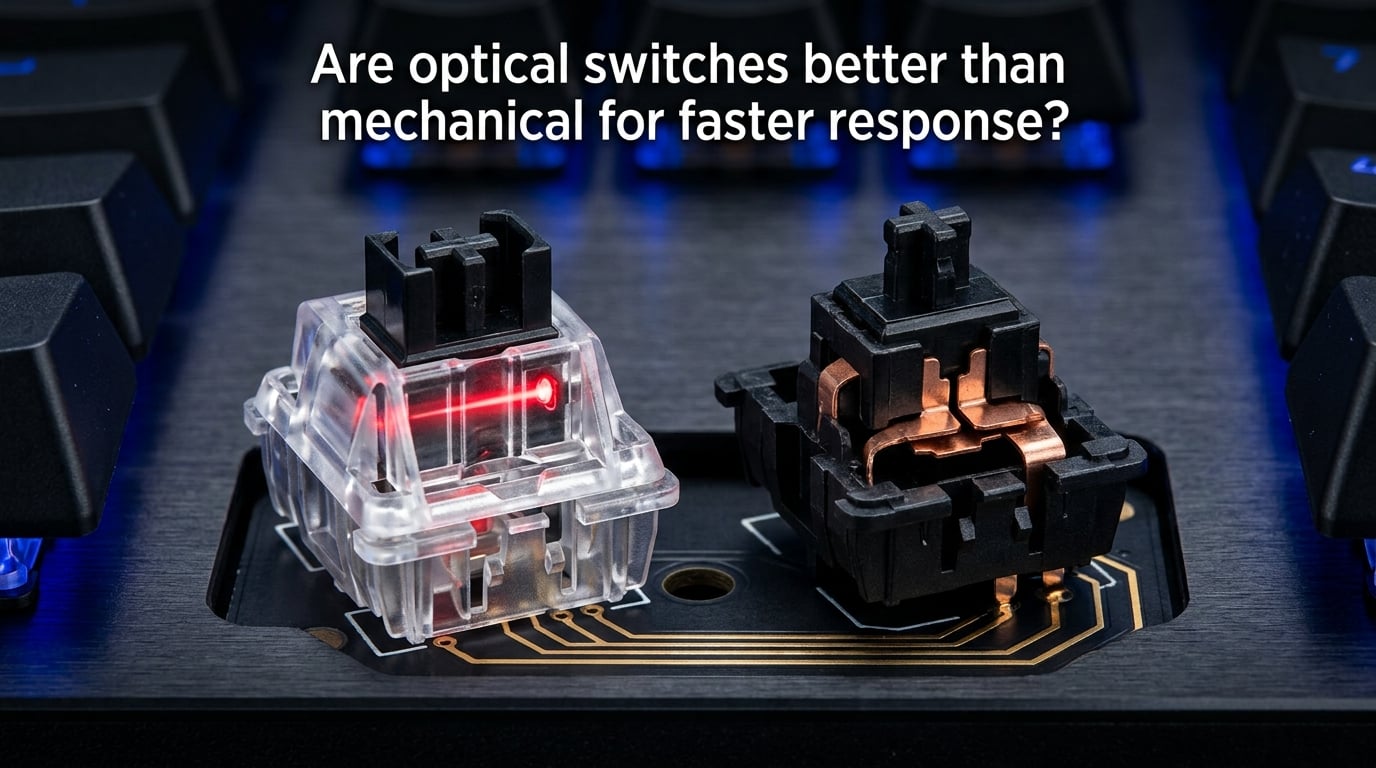
Are optical switches better than mechanical for faster response? Yes, they are — but the real-world difference is far smaller than marketing claims suggest. Optical switches eliminate the 5-millisecond debounce delay that mechanical switches need to prevent false triggers, giving you a theoretical speed edge. However, within the 200 to 250 milliseconds of average human reaction time, most players will never notice the difference in practice.
In this guide, I break down exactly how each switch technology works, compare their real performance numbers, and help you decide whether optical switches are worth the switch — or if you should stick with mechanical. We tested both over several weeks and analyzed data from competitive players to give you the honest answer.
Table of Contents
How Optical Switches Work
Optical switches use light to detect when you press a key. Beneath each keycap sits an infrared LED that constantly beams light toward a photosensor on the other side. When you press the key down, a small blocker interrupts that light beam, and the switch registers the input instantly.
Because there’s no physical metal contact involved, optical switches don’t suffer from contact bouncing — the tiny, rapid electrical fluctuations that happen when metal surfaces meet. This is why they can skip the debounce delay entirely. The entire actuation happens at the speed of light, making the theoretical response time around 0.2 milliseconds.
The mechanism itself is straightforward. There are no metal leaves, no solder joints, and no physical contact points to wear down over time. This simplicity translates directly into durability. Most optical switches are rated for 100 million keystrokes, compared to 50 to 80 million for typical mechanical switches.
Optical switches come in linear, tactile, and clicky variants, though the selection is narrower than what you’ll find in the mechanical market. Brands like Razer, Wooting, and SteelSeries have invested heavily in optical technology, and options continue to expand each year.
How Mechanical Switches Work
Mechanical switches rely on physical metal-to-metal contact to register a keypress. When you push a key down, two thin metal leaves inside the switch housing touch each other, completing an electrical circuit. The keyboard’s controller detects this closed circuit and registers the keystroke.
The problem with this approach is contact bouncing. When the metal leaves make contact, they don’t connect cleanly — they bounce against each other briefly, creating rapid on-off signals. To prevent false double-registrations, the keyboard firmware introduces a debounce delay, typically 5 to 15 milliseconds, to filter out the noise.
Mechanical switches have been the standard for decades, and the technology is mature. Cherry MX, Gateron, Kailh, and dozens of other manufacturers produce switches in every flavor imaginable — from the smooth linear Reds to the clicky, tactile Blues. This variety is one of the biggest advantages of the mechanical ecosystem.
Because they rely on physical contact, mechanical switches do degrade over time. The metal leaves can lose tension, oxidize, or develop the infamous double-clicking problem where a single press registers twice. This is the number one complaint about mechanical switches in communities like Reddit’s r/MechanicalKeyboards.
Optical vs Mechanical Switches: Key Differences
The table below shows how these two technologies stack up across the metrics that matter most.
| Feature | Optical Switches | Mechanical Switches |
|---|---|---|
| Response Time | ~0.2 ms (no debounce delay) | ~5-15 ms (debounce delay included) |
| Debounce Delay | None — light-based detection eliminates it | 5-15 ms depending on firmware |
| Keystroke Lifespan | 100 million keystrokes | 50-80 million keystrokes |
| Double-Click Risk | Essentially zero — no contact degradation | Common issue after extended use |
| Switch Variety | Limited — fewer brands and options | Massive — hundreds of options from dozens of brands |
| Customization | Limited keycap and switch options | Extensive keycap sets, springs, stems |
| Hot-Swappable | Only between optical switches | Compatible with all MX-style switches |
| PCB Compatibility | Requires optical-specific PCB | Works with standard mechanical PCBs |
| Noise Level | Similar to mechanical (depends on type) | Varies widely by switch type |
| Typical Cost | Comparable to mid-range mechanical boards | Wider range from budget to premium |
The most significant technical difference is the debounce delay. Mechanical switches need 5 to 15 milliseconds of firmware-level debouncing to function correctly. Optical switches bypass this entirely because light detection doesn’t produce contact bouncing. In theory, this means your keypress registers faster.
But here’s the context most articles skip: the difference between a 0.2 ms response and a 5 ms response is 4.8 milliseconds. That’s roughly 1/200th of a second. Your brain takes 200 to 250 milliseconds just to process a visual stimulus and decide on a response. The switch speed difference is a rounding error compared to human neurological limits.
Durability is where optical switches hold a clearer advantage. A 100 million keystroke rating versus 50 million is a meaningful gap. If you game heavily or type all day, optical switches will last noticeably longer before developing issues like inconsistent actuation or double-registering.
Gaming Performance: Does the Speed Difference Actually Matter?
This is where the conversation gets honest. If you’re wondering whether optical switches will make you better at games, the answer is: probably not in any measurable way.
Let me explain. The total input chain from your eyes seeing an enemy on screen to your finger pressing a key involves several steps. Your visual processing takes 150 to 200 milliseconds. Your brain deciding to act takes another 50 to 100 milliseconds. The mechanical movement of your finger pressing the key adds 30 to 50 milliseconds. The switch response itself — whether 0.2 ms or 5 ms — is the smallest piece of that entire chain.
Switching from a 60 Hz monitor to a 144 Hz monitor gives you roughly a 20 millisecond advantage in visual clarity. That’s four to five times larger than the entire optical-vs-mechanical difference. Upgrading your internet connection from 50 ms to 20 ms ping has a bigger impact than any switch technology.
That said, there are scenarios where the difference might matter at the highest competitive levels. In counter-strike or Valorant, counter-strafing requires precise timing to stop movement and fire accurately. In fighting games, animation canceling demands frame-perfect inputs. In MOBAs with high actions-per-minute gameplay, consistent registration helps during intense teamfights.
But for 99% of players, the mechanical advantage of optical switches over mechanical ones is effectively zero. Professional esports players have won major tournaments on both types. What matters far more is your practice time, game sense, and hardware setup beyond the switch type.
Where optical switches genuinely help gaming is in consistency over time. Because there are no metal contacts to degrade, your inputs stay consistent even after months of heavy use. A mechanical switch might develop inconsistent actuation after a year of intense gaming — an optical switch will feel the same on day 300 as it did on day one.
Downsides of Optical Switches You Should Know
Optical switches aren’t universally better, and there are real trade-offs worth considering before you commit.
The biggest downside is customization. The mechanical switch ecosystem is enormous — you can swap springs, stems, housings, and keycaps from dozens of manufacturers. With optical switches, you’re locked into a much smaller pool of compatible options. If you enjoy tuning your switches to feel exactly right, mechanical gives you far more room to experiment.
PCB compatibility is another constraint. Optical switches require a specific optical PCB — you can’t drop them into a standard mechanical keyboard. This means if you already own a mechanical keyboard and want to try optical switches, you need a completely new board. There’s no upgrade path.
Many enthusiasts also report that optical switches feel slightly different from their mechanical counterparts. The tactile feedback on optical tactile and clicky switches doesn’t always match the crispness of a Cherry MX Blue or Holy Panda. If typing feel is your priority, mechanical switches still have the edge for most people.
Price is worth mentioning too. While the gap has narrowed, optical switch keyboards often sit in the mid-to-premium range. Budget optical options exist, but the best implementations come at a cost. Mechanical boards span from very affordable to extremely expensive, giving you more flexibility at every price point.
Hall Effect and Magnetic Switches: The Third Option
Before you decide between optical and mechanical, there’s a third technology worth knowing about. Hall Effect switches use magnets and sensors to detect keypresses — no light beam, no metal contact.
These switches are gaining traction fast in 2026. They offer the same zero-debounce advantage as optical switches while supporting analog input, meaning they can detect how far you’ve pressed a key, not just whether you’ve pressed it. This enables features like adjustable actuation points and rapid trigger, where keys reset the instant you start lifting your finger.
Brands like Wooting, SteelSeries, and Razer have released Hall Effect boards that outperform both optical and mechanical in raw speed metrics. If you’re looking for the fastest possible input technology, magnetic switches might be the better answer to the optical versus mechanical question.
Frequently Asked Questions
Is mechanical or optical better for gaming?
Optical switches are technically better for gaming because they eliminate debounce delay, registering keypresses in about 0.2 milliseconds compared to 5-15 milliseconds for mechanical switches. However, the real-world advantage is negligible since human reaction time is 200-250 milliseconds. Both are perfectly suitable for competitive gaming.
What are the downsides of optical switches?
The main downsides of optical switches are limited customization options, smaller switch variety compared to mechanical, PCB compatibility restrictions (they require optical-specific boards), and sometimes inferior tactile feedback. You also cannot use optical switches on standard mechanical keyboard PCBs, which limits upgrade paths.
Are optical switches worth the extra cost?
Optical switches are worth it if you value long-term consistency and durability over customization. They eliminate the double-clicking problem common with mechanical switches and are rated for 100 million keystrokes versus 50-80 million. For competitive gamers who want inputs that stay reliable over years of heavy use, the investment makes sense.
Do optical switches feel the same as mechanical?
Optical switches feel similar but not identical to mechanical switches. Linear optical switches are nearly indistinguishable from linear mechanical ones. However, tactile and clicky optical switches often lack the crisp feedback of premium mechanical switches like Cherry MX Blue or Holy Panda. Many users in blind tests cannot tell the difference with linear variants.
How much faster are optical switches?
Optical switches register keypresses in approximately 0.2 milliseconds compared to 5-15 milliseconds for mechanical switches with debounce delay. That’s roughly a 5-15 millisecond advantage. However, this difference is imperceptible to humans given that our reaction time is 200-250 milliseconds. The upgrade from a 60 Hz to 144 Hz monitor provides roughly 20 milliseconds of improvement — far more than any switch difference.
What is debounce delay and why does it matter?
Debounce delay is a 5-15 millisecond pause that mechanical keyboard firmware adds after detecting a keypress. It exists because when metal contacts touch inside a mechanical switch, they physically bounce against each other, creating rapid false signals. The delay filters out these false triggers so each press registers only once. Optical switches do not need debounce delay because they use light detection instead of metal contact.
Conclusion: Which Should You Choose?
If you’re deciding between optical vs mechanical switches, here’s my honest recommendation after testing both extensively.
Choose optical switches if you prioritize long-term consistency, want to eliminate any risk of double-clicking, and don’t mind a smaller selection of switch options. They’re a solid choice for competitive gamers who want inputs that stay reliable over time.
Choose mechanical switches if you value customization, enjoy experimenting with different switch types, or care deeply about typing feel. The mechanical ecosystem is larger, more mature, and offers options at every price point.
Either way, the response time difference between optical and mechanical switches is unlikely to change your gaming performance. Focus on your monitor, your internet connection, and your practice — those factors matter exponentially more than a few milliseconds of debounce delay.