
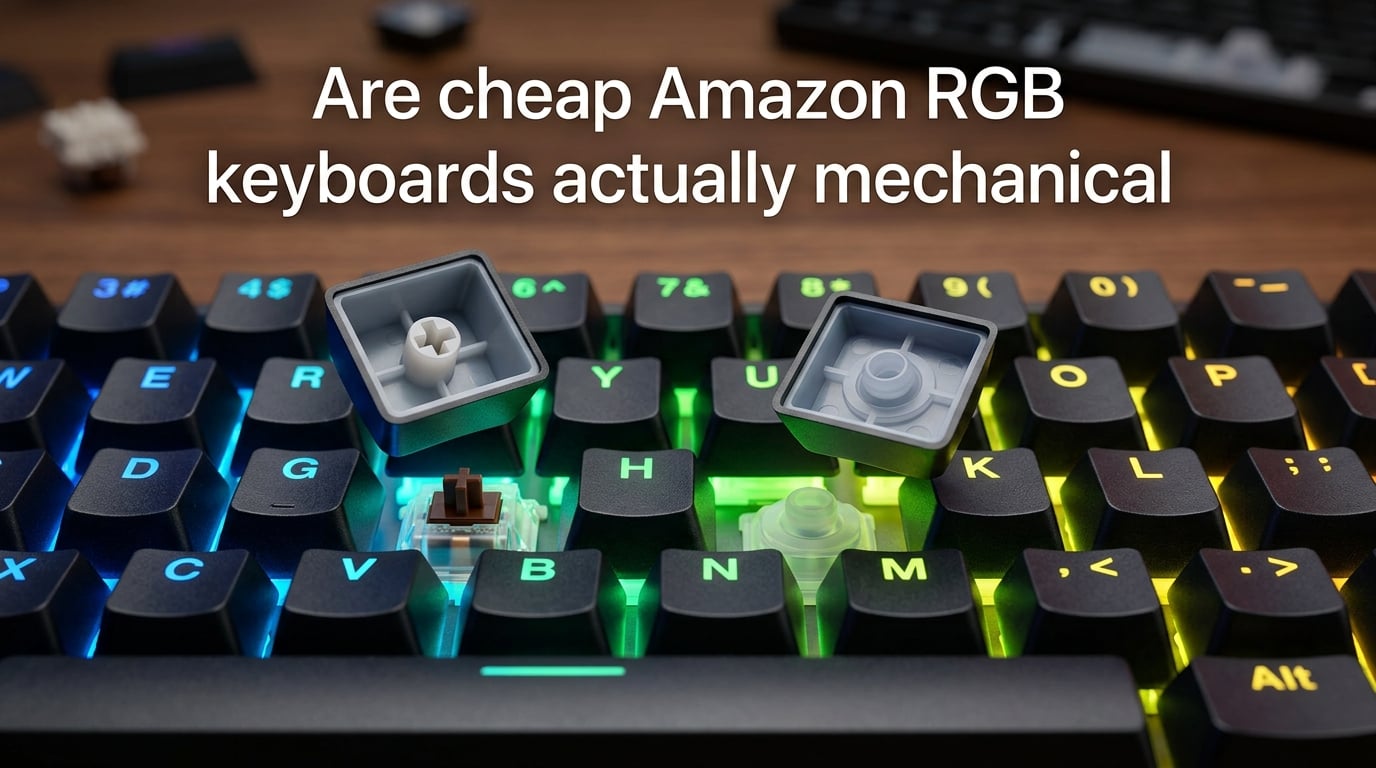
Some cheap Amazon RGB keyboards are genuinely mechanical, but a large share are mecha-membrane hybrids that use a rubber dome under a plastic housing made to look like a real switch. A true mechanical keyboard has an individual spring-loaded switch under every key, with a stem that actuates a metal contact at a precise point. Mecha-membrane boards look similar on a listing photo but feel mushier, sound duller, and usually wear out faster.
I have tested dozens of sub-$50 RGB boards over the past few years, and the gap between a real mechanical switch and a dressed-up rubber dome is obvious the moment you type on one. This guide walks you through what “mechanical” actually means at the switch level, how to tell the fakes from the real deal, and which Amazon sellers you can trust when you are shopping on a budget.
Table of Contents
What Does “Mechanical” Actually Mean for a Keyboard?
A mechanical keyboard uses one independent physical switch under each keycap. Each switch contains a spring, a moving stem, and a metal contact (or Hall-effect sensor on newer boards). When you press a key, the stem compresses the spring until it trips the contact, which sends a signal to the keyboard’s controller.
The defining features of a true mechanical switch are the spring-loaded actuation, the defined actuation point (usually 1.5 to 2 mm of travel before the keypress registers), and the replaceable nature of the switch. Most mechanical switches are rated for 50 to 100 million keystrokes, compared to roughly 5 to 10 million for a rubber-dome membrane.
That lifespan difference is why enthusiasts pay more for mechanical boards. It is also why sellers slap the word “mechanical” on cheaper keyboards, even when the internals do not match.
Membrane vs Mecha-Membrane vs True Mechanical
Most cheap Amazon RGB keyboards fall into one of three categories. Knowing the difference is the single fastest way to stop overpaying for what is essentially a rubber-dome keyboard.
| Type | How It Works | Feel | Sound | Durability |
|---|---|---|---|---|
| Membrane (rubber dome) | A single rubber sheet under all keys collapses onto a printed circuit board | Mushy, spongy, inconsistent | Soft thud | 5 to 10 million keystrokes |
| Mecha-membrane hybrid | Individual plastic housings over rubber domes, no spring | Firmer than membrane but still soft | Dull click or muted thock | 8 to 15 million keystrokes |
| True mechanical | Individual spring-loaded switches with metal contacts | Consistent, tactile or linear, precise | Crisp click, thock, or smooth glide | 50 to 100 million keystrokes |
The mecha-membrane category is the one to watch on Amazon. These boards look like mechanical keyboards in photos because each key sits in its own plastic housing with a colored “switch” stem on top. Underneath, though, there is still a rubber dome doing the work. You get the look without the feel or the longevity.
Switch Types: Linear, Tactile, and Clicky Explained
If a board is truly mechanical, the listing should tell you which switch type it uses. Each type gives a different typing feel, and most enthusiasts have a strong preference.
Linear switches feel smooth from top to bottom with no bump or click. They are popular with gamers because the uninterrupted travel lets you press the same key twice quickly. Cherry MX Red, Gateron Yellow, and Kailh Red are common linear options.
Tactile switches have a small bump in the middle of the keypress that you can feel under your finger. Typists love them because the bump confirms the key has registered without needing to bottom out the key. Cherry MX Brown, Gateron Brown, and Kailh Brown sit in this category.
Clicky switches add an audible click on top of the tactile bump. They are loud, satisfying for some, and hated by everyone in an open office. Cherry MX Blue, Kailh Blue, and Outemu Blue are the classics here.
If the Amazon listing only says “blue switch” or “red switch” without naming a manufacturer, that is a red flag. Real listings from Redragon, Keychron, AULA, and similar brands always name Cherry MX, Gateron, Kailh, or Outemu clones.
5 Ways to Verify a Keyboard Is Actually Mechanical
If you are staring at a board on Amazon or one that already arrived at your door, these five checks will tell you whether it is real mechanical or a mecha-membrane in disguise.
- Look for a named switch brand. Cherry MX, Gateron, Kailh, and Outemu are the four names that dominate the budget mechanical market. If none are mentioned, the listing is hiding something.
- Check the actuation force and travel. Real listings state an actuation force in centinewtons (cN) and a travel distance in millimeters. Vague phrases like “professional gaming feel” without numbers are a red flag.
- Read the sound and feel reviews. Reviewers who specifically compare the board to a Cherry MX board, mention a switch tester, or describe a “thock” or “click” sound have likely tested the switches. Reviews that only praise the RGB lighting tell you nothing.
- Pull a keycap and inspect the stem. A real mechanical switch has a cross-shaped stem with four slots. A mecha-membrane board often has a simpler or rounded stem because the rubber dome is doing the work.
- Look at the price floor. Real mechanical keyboards on Amazon rarely dip below a certain point, even on heavy discount. If a “mechanical RGB” keyboard is priced well below the cheapest Redragon or AULA, the internals almost certainly are not mechanical.
Amazon Listing Red Flags That Signal a Fake Mechanical
After scrolling through hundreds of Amazon listings, I keep seeing the same warning signs on fake mechanical keyboards. Treat any of these as a reason to walk away.
- The title says “mechanical feel” or “mechanical-style” instead of mechanical.
- No switch brand is named anywhere in the listing.
- The product description mentions “high-quality membrane” anywhere, even if the title says mechanical.
- The stock photos show colored “switch” housings but the description never mentions Cherry MX, Gateron, Kailh, or Outemu.
- The seller is brandless or has a randomized seller name with no website.
- Reviews repeatedly mention “mushy keys,” “no click,” or “feels like a laptop keyboard.”
- The price is suspiciously low for a full-size RGB mechanical board with hot-swap and wireless.
The single biggest red flag is the phrase “mechanical feel.” Sellers who use that wording are usually describing a mecha-membrane hybrid, and they are legally required to disclose it because calling the board outright mechanical would be false advertising.
RGB: Real Per-Key vs Single-Zone Marketing
RGB backlighting is one of the most abused marketing terms in the keyboard world. Cheap mecha-membrane boards often advertise “RGB lighting” when they only have a single LED strip under the keys that cycles through colors. Real per-key RGB means every key has its own addressable LED so you can program individual colors and effects.
You can usually tell the difference by reading the listing carefully. Phrases like “rainbow backlight,” “7-color breathing,” or “RGB light bar” describe single-zone lighting. Genuine per-key RGB listings say “per-key programmable lighting,” “addressable RGB,” or mention specific software like QMK, VIA, or the manufacturer’s configuration tool.
For gaming and typing, the lighting quality matters less than the feel. For streaming or aesthetic builds, however, single-zone RGB looks washed-out next to true per-key lighting on a Ducky or Wooting board.
Verified Budget Mechanical Keyboard Brands Worth Trusting
If you are shopping on Amazon specifically, these brands have built consistent reputations for shipping real mechanical switches, even at lower prices.
Redragon is the most common budget mechanical brand on Amazon. They use Outemu and their own clones, label them clearly, and most of their RGB keyboards are true mechanical at prices that beat most of the no-name competition.
AULA has become a favorite for hot-swappable budget boards. Their keyboards typically ship with Gateron or Outemu clones, support full key remapping, and include software for per-key RGB.
Keychron sits in the mid-range and offers wireless mechanical keyboards with Gateron or Kailh switches. The V-series is popular for hot-swap, and Keychron lists every switch option on its Amazon storefront.
Ducky is a long-standing enthusiast favorite. Their One 2 and Shine series ship with Cherry MX or Kailh switches, and the listings always name the exact switch.
Wooting makes analog Hall-effect mechanical keyboards, which are a different technology but still mechanical in the strict sense. They are more expensive but are the gold standard for competitive gaming keyboards.
For mainstream gaming brands, Logitech, Corsair, and Razer all sell real mechanical keyboards on Amazon. They cost more, but the listings are transparent about the switch type, and warranty support is straightforward.
How to Safely Pop a Keycap and Inspect the Switch
If a keyboard has already arrived and you want to confirm what is inside, popping a keycap is the most direct check. Most keycaps pull off without tools, but a wire keycap remover is the safest option and costs almost nothing.
- Unplug the keyboard. Never inspect switches while the board is powered.
- Slide a wire keycap remover over a keycap on a less critical key, like a number row key or the spacebar.
- Pull straight up with even pressure until the keycap pops off. Twisting will bend the stem.
- Look at the stem underneath. A real mechanical switch has a clean cross-shaped stem with a visible spring or housing wall. A mecha-membrane shows a simpler plastic post sitting over a rubber dome.
- Press the exposed switch with your finger. A real mechanical switch has a clear actuation point and returns crisply. A mecha-membrane collapses softly and feels spongy.
- Snap the keycap back on by aligning the cross stem with the cross slot and pressing down evenly.
If you are nervous about damaging a brand-new board, test on a board you have used for a year. The worst-case scenario on an old board is a bent keycap, which you can replace for a few dollars.
How Much Should You Spend for a Real Mechanical Keyboard?
Real mechanical keyboards start at a specific price point, and going below it almost always means a mecha-membrane hybrid. As of 2026, the cheapest genuine full-size RGB mechanical keyboards on Amazon from known brands hover in the entry-level tier, and tenkeyless hot-swap boards with Gateron or Outemu clones sit a bit higher.
Spending more does not always mean a better typing experience, but it usually does buy you better switches, sturdier cases, and per-key RGB. Wireless and hot-swappable designs add to the price but also to the long-term value, because you can swap switches without soldering.
The sweet spot for most people is a mid-range mechanical keyboard from Keychron, Ducky, or a similar brand. Below that, stick to Redragon or AULA and you will still get a real mechanical board.
Frequently Asked Questions
How can I tell if a keyboard is mechanical?
Look for a named switch brand such as Cherry MX, Gateron, Kailh, or Outemu in the listing. Check the actuation force and travel distance. Pull a keycap and inspect the stem: a real mechanical switch has a cross-shaped stem over a spring-loaded housing, while a mecha-membrane has a simple post over a rubber dome. Real mechanical switches also feel consistent across all keys, with a clear actuation point and a crisp return.
What is the best budget keyboard on Amazon?
For a true mechanical keyboard at a budget price, Redragon and AULA consistently ship real mechanical switches with per-key RGB at lower price points than most competitors. Keychron sits a step higher in price but offers wireless and hot-swap options. Avoid any keyboard that does not name its switch brand in the listing, because that is the most common signal of a mecha-membrane hybrid.
What is the best price for a cheap RGB keyboard?
A genuine mechanical RGB keyboard from a known brand usually starts in the entry-level tier, with full-size wireless and hot-swap models sitting higher. If a full RGB mechanical board is priced well below the cheapest Redragon or AULA option, the switches are almost certainly not mechanical. Spending more generally buys you better switches, sturdier construction, and per-key programmable RGB.
What is a 96% keyboard missing?
A 96% keyboard keeps the numpad and most function keys but drops the dedicated navigation cluster, the arrow keys are tucked under the numpad area. Compared to a full-size board, you lose the dedicated arrow cluster and a few function keys, but you keep the numpad, which is the main reason people pick 96% over 65% or 75% layouts.
Final Verdict
So, are cheap Amazon RGB keyboards actually mechanical? Some are, but many are not. The fastest check is the listing itself: a real mechanical keyboard names its switch brand, lists its actuation force and travel, and comes from a seller you can verify. Anything that hides the switch details is almost always a mecha-membrane dressed up in colored plastic.
Stick to Redragon, AULA, Keychron, Ducky, or Wooting, and you will get a real mechanical keyboard at a budget price. Pull a keycap on arrival to confirm, and you will never wonder whether the board you just bought is the real thing.